Dusk Analyst

Trading Journal

Track your trades. Sharpen your edge.

Secured by Auth0

Dusk AnalystDUSK
  • Workspace
  • Your journal
Trading workspace

Dashboard

AI Credits
Accounts
Your consistency

Check in once a day, or just log a trade, import or review: either counts. Weekdays keep your streak going. Weekends are optional and earn double XP. XP builds your level and never resets, even if a streak does.

0day streak
Weekdays keep it going
This week
Level 0 · Starter0 XP
Checked in today

PnL Balance

No trades yetSync a connector or add a trade and your balance curve appears here.
P&L$0.00
Win Rate—
Total Trades0
Avg Win—
Daily PnL
No trades yetYour daily P&L will chart here.
Performance by Day
No trades yetWeekday performance appears once you log trades.
AI Insights

Recent Trades

No trades yet. Start your journal by adding your first trade.

0 selected
Date Symbol Direction Entry Exit P&L
Connectors
+ Add Connector

API Key for this account (use in EA):

This key works for every connector in this account (MT4, MT5, cTrader).

Trade Calendar

P&L Performance

Win / Loss
Trade sync

Your platforms. One journal.

Connect your trading platforms to auto-sync trades to your journal. Choose your platform for the download and step-by-step setup.

↗

Add a connector to your account on the Dashboard, then use its API key to complete setup below.

4MetaTrader 4Expert Advisor · MT4Setup guideDownload Expert Advisor

Security note: Dusk Analyst is only distributed from this website — this is the only place you can download our EA. If you find an EA anywhere else claiming to be Dusk Analyst, do not download it — we can't guarantee it isn't malicious. We will never trade on your behalf; the settings you enable here only let us read your closed trade history so it syncs to your dashboard.

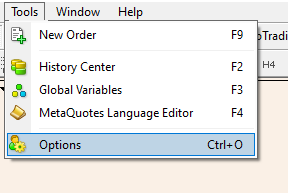
  1. In MetaTrader 4, open the top menu: Tools → Options
    Tools menu > Options
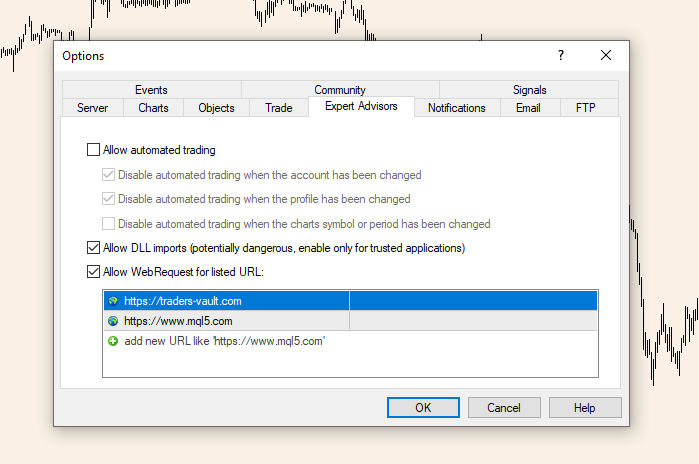
  2. This opens a pop-up. In the Expert Advisors tab, tick Allow DLL imports and Allow WebRequest for listed URL, select the URL input below and paste https://duskanalyst.com , then OK
    Expert Advisors options
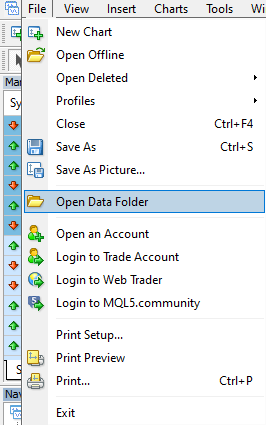
  3. In the top menu, open File → Open Data Folder — this opens a file explorer pop-up
    File menu > Open Data Folder
  4. In the file explorer, open the MQL4 folder, then the Experts folder, and drop in your downloaded dusk-analyst-ea-mt4.ex4 file
    MQL4 Experts folder
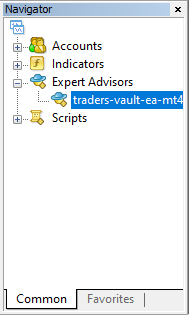
  5. In the Navigator panel (left side), expand Expert Advisors and drag dusk-analyst-ea-mt4 onto any chart
    Navigator > Expert Advisors
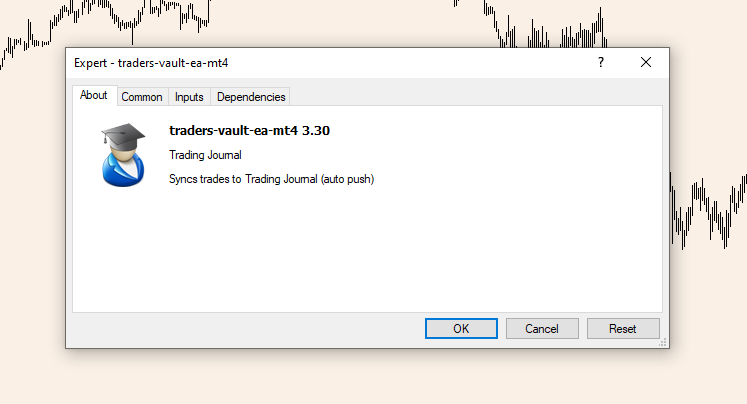
  6. The EA settings pop-up opens
    EA settings pop-up
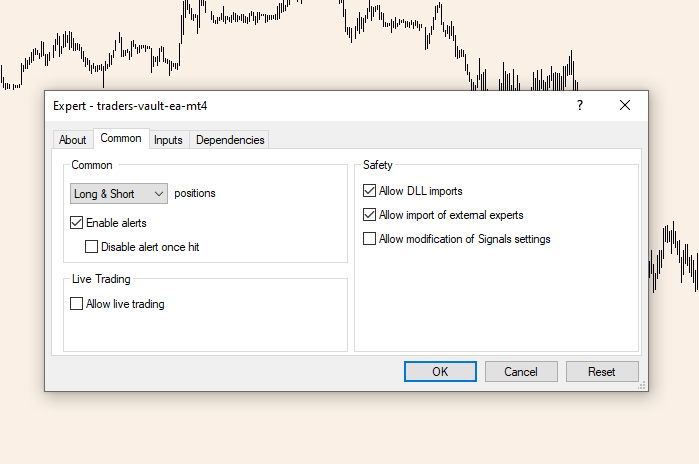
  7. Go to the Common tab and tick Allow DLL imports and Allow import of external experts
    EA Common tab
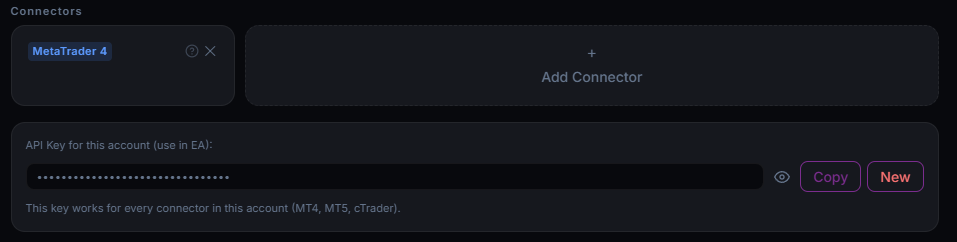
  8. In Dusk Analyst, open the sub-account you want to connect, scroll to Connectors, add a MetaTrader 4 Connector, then press Copy for the API key
    Connectors page
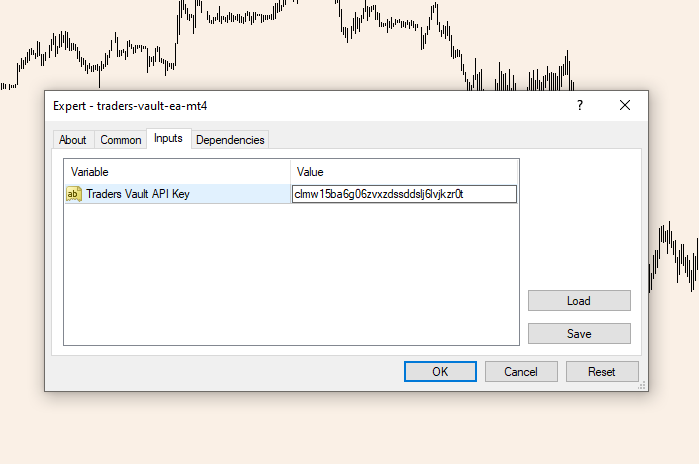
  9. Back in MetaTrader 4, go to the Inputs tab and paste your API key
    EA Inputs tab

Done — your trades now sync to your Dusk Analyst dashboard automatically, on every chart and every pair. Stuck? support@duskanalyst.com

5MetaTrader 5Expert Advisor · MT5Setup guideDownload Expert Advisor

Security note: Dusk Analyst is only distributed from this website — this is the only place you can download our EA. If you find an EA anywhere else claiming to be Dusk Analyst, do not download it — we can't guarantee it isn't malicious. We will never trade on your behalf; the settings you enable here only let us read your closed trade history so it syncs to your dashboard.

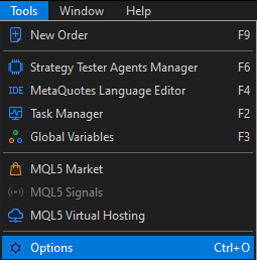
  1. In MetaTrader 5, open the top menu: Tools → Options
    Tools menu > Options
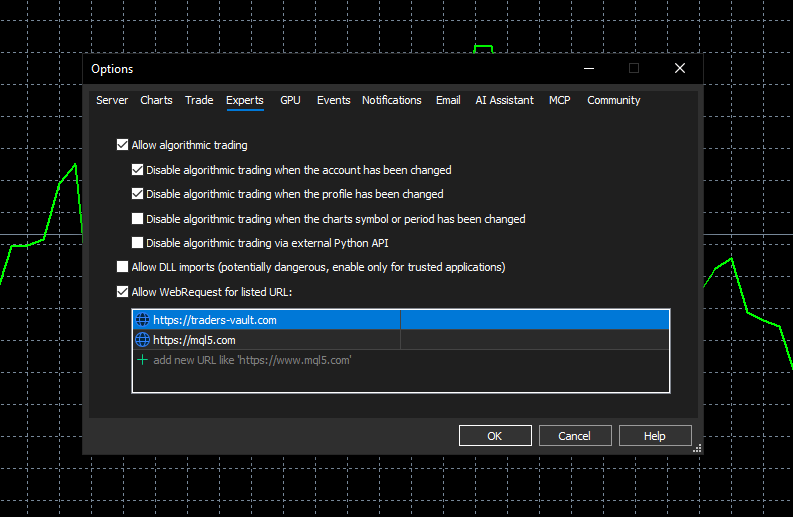
  2. This opens a pop-up. In the Expert Advisors tab, tick Allow algorithmic trading, Allow DLL imports and Allow WebRequest for listed URL, select the URL input below and paste https://duskanalyst.com , then OK
    Expert Advisors options
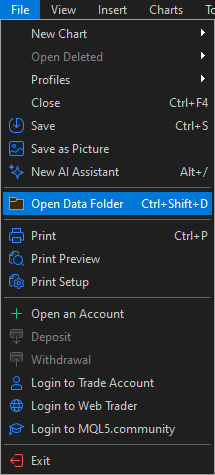
  3. In the top menu, open File → Open Data Folder — this opens a file explorer pop-up
    File menu > Open Data Folder
  4. In the file explorer, open the MQL5 folder, then the Experts folder, then the Advisors folder, and drop in your downloaded dusk-analyst-ea-mt5.ex5 file
    MQL5 Experts Advisors folder
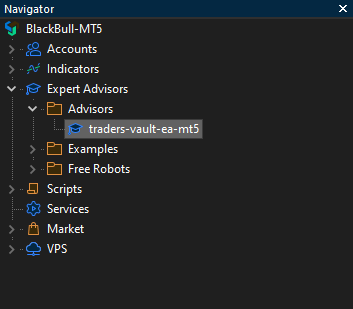
  5. In the Navigator panel (left side), expand Expert Advisors and drag dusk-analyst-ea-mt5 onto any chart
    Navigator > Expert Advisors
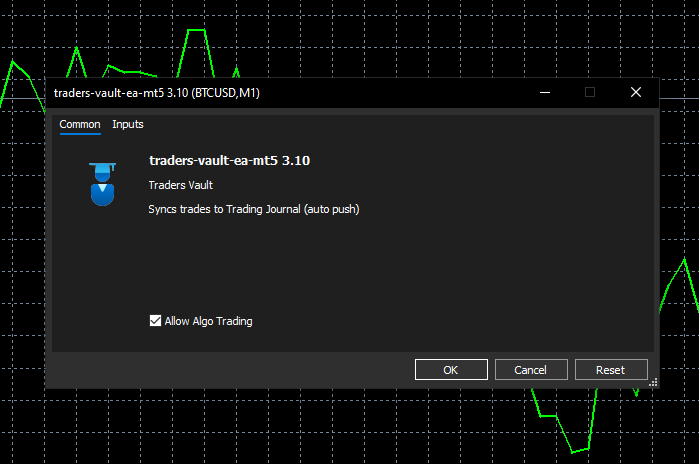
  6. The EA settings pop-up opens — tick Allow algorithmic trading
    EA settings pop-up
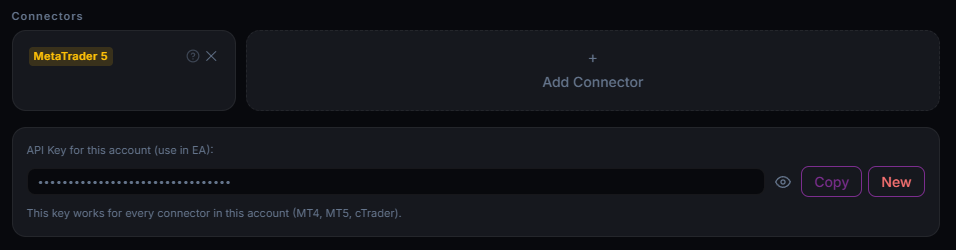
  7. In Dusk Analyst, open the sub-account you want to connect, scroll to Connectors, add a MetaTrader 5 Connector, then press Copy for the API key
    Connectors page
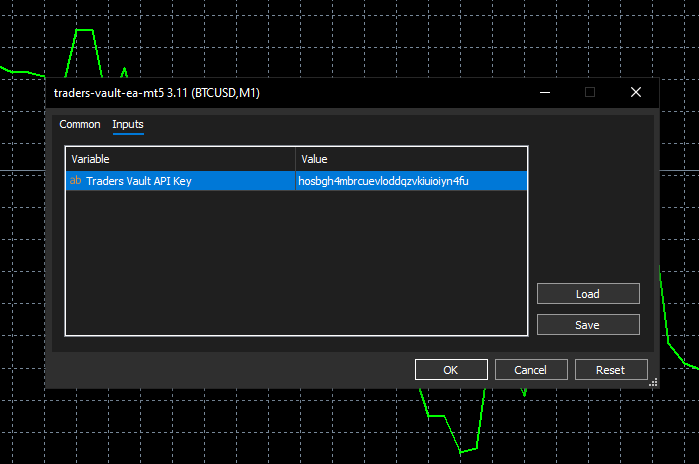
  8. Back in MetaTrader 5, go to the Inputs tab and paste your API key
    EA Inputs tab

Done — your trades now sync to your Dusk Analyst dashboard automatically, on every chart and every pair. Stuck? support@duskanalyst.com

ccTradercBot · cTraderSetup guideDownload cBot

Security note: Dusk Analyst is only distributed from this website — this is the only place you can download our cBot. If you find a cBot anywhere else claiming to be Dusk Analyst, do not download it — we can't guarantee it isn't malicious. We will never trade on your behalf; the settings you enable here only let us read your closed trade history so it syncs to your dashboard.

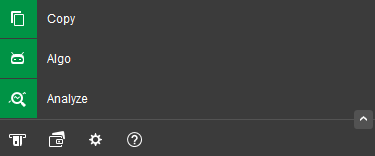
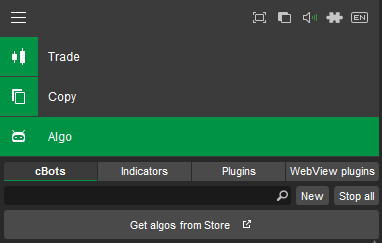
  1. On the left panel of cTrader, click the Algo button
    cTrader left panel - Algo button
  2. At the top, make sure cBots is selected, then click New (just below, to the right)
    cTrader Automate - cBots selected and New button
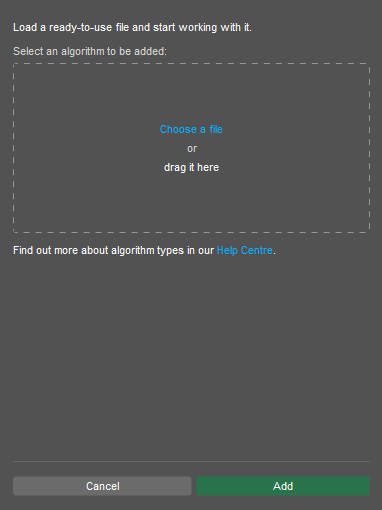
  3. A pop-up appears — click Choose a file and select your downloaded dusk-analyst-cbot-ctrader.algo
    Choose a file pop-up
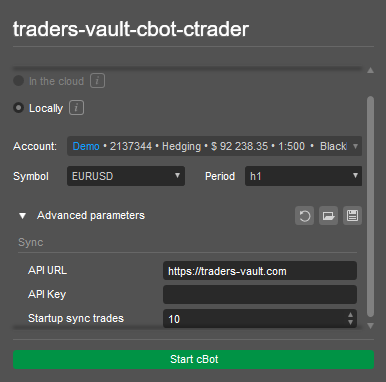
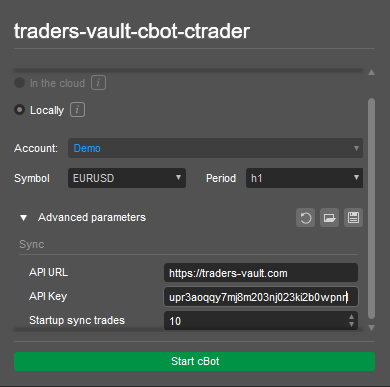
  4. Select the cTrader account you want to add it to, then open the Advanced parameters drop-down
    Select account and Advanced parameters
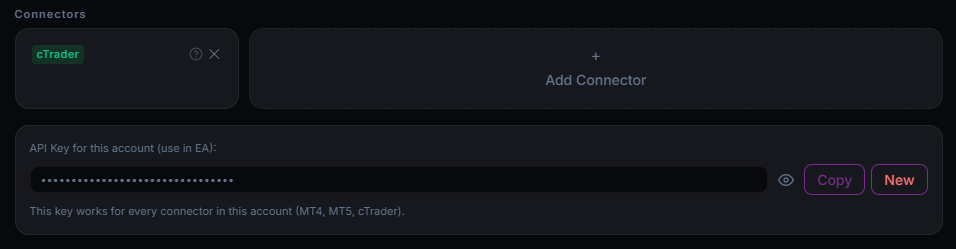
  5. In Dusk Analyst, open the sub-account you want to sync, scroll to Connectors, add cTrader, then press Copy on the API key below it
    Dusk Analyst connectors - API key copy
  6. Back in cTrader, paste the Dusk Analyst API key into the cBot’s API key input
    cBot API key input
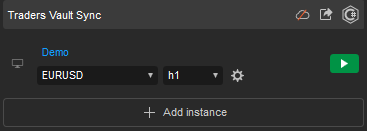
  7. On the left panel you’ll see Dusk Analyst Sync (scroll to the bottom if you don’t) — press Play on any chart and you’re good to go
    Dusk Analyst Sync in the left panel - Play

Done — your trades sync to your Dusk Analyst dashboard automatically on every close. Stuck? support@duskanalyst.com

All Trades

No trades yet.

DateSymbolDirectionEntryExitP&L

Analytics

Coming soon — performance metrics and breakdowns.

Performance review

Make time for the review.

Turn your trading history into a clearer picture of what is working. Weekly and monthly reports bring every account together.

W

Weekly Reports

Reflect on your week

One row per week across all your accounts — a week is ready to report the Monday after it ends. Generate on your click.

M

Monthly Reports

See the bigger picture

Monthly summaries auto-detected — a month is ready to report once it ends. Monthly reports are a Pro feature; weekly reports are free.

$0.00
Win Rate—
Profit Factor—
Trades0
Equity Curve
P&L by Day
Best Day—
Worst Day—
Max Drawdown$0.00

Quant AI Insights

🔍
Pattern Spotted
—
⚡
Behavior Flag
—
📏
Consistency Note
—
👀
Watch This
—

Tag Performance

Powered by Quant AI

Analyzing your week...

AI Insights

Ask questions about your trading performance. Pick an account below to focus the analysis.

Quant AI
Try something like:
AI
Hello! I can help analyze your trading data. Use the AI to analyze your trades — like "What's my win rate?" or "Which day of the week performs best?"
Trading notebook

A little space to think.

Trade ideas, plans, screenshots, and lessons. Keep them together, one page at a time.

Pages
Trading toolkit

A more deliberate trading day.

Keep your process on plan with checklists and a quick position-size calculator.

✓

Checklists

Build a process you can repeat
Checklists
÷

Lot Calculator

Plan your position size
Risk amount$100.00
Lots to risk0.50

Position size = (balance × risk%) ÷ (SL pips × pip value). Pip values are approximate for standard lots — verify with your broker.

Affiliates

Feedback

Help shape Dusk Analyst.

Found a rough edge or have an idea? Your feedback helps us make the journal better.

Send us a note

Tell us what you think — bugs, ideas, anything.
Thanks — we read every message.
↗

Every detail helps

Something not working?

Tell us which page you were on, what you tried, and what happened.

An idea for the journal?

Tell us what you want to do and how it would fit into your trading routine.

Thanks for helping us build a better place to review your trading.

Your tag library

Find the patterns behind your trades.

Organise trades by strategy, setup, and outcome. A consistent set of tags makes every review more useful.

Create a tag

Your tags

Grouped by category

No tags yet. Add your first tag above.

How tags work
Tags let you label trades (e.g. news, breakout, revenge) so the journal can group them. Create a tag, apply it to trades, then use the filter button to compare win rate and P&L per tag — that is where the patterns show up.

Completing sign in...

Verify Your Email

We sent a verification email. Click the link in it to activate your account.

No email yet? Check your spam folder first. You can ask for a new one below.

←

Manage Subscription

AI Credits
PlanFree
Status-
Renewal-
←

Manage Subscription

PlanFree
Status-

Add Connector

Regenerate API key?

This will invalidate the current key. You will have to change the API key manually in the trading platforms for all connectors.

Delete account?

This permanently deletes all of your trades, accounts, screenshots, reports, and subscription, and signs you out. This cannot be undone.

Filter by tag

🎉 Welcome to Dusk Analyst

Congratulations on taking the leap. This is where discipline meets success — log your trades, review your numbers, and let consistency do the rest.

Pro Feature

This is a Pro-only feature. Unlock it now by subscribing.

This is a Pro feature

    Apply to become an affiliate and start earning

    Tell us why we should choose you to be an affiliate.

    0 / 250 words
    Thank you for applying. Should you become successful, we will contact you.

    You've clicked a referral link

    To purchase and claim the discount, click here:

    Notifications

    P&L
    + Add Screenshot Click, drag & drop, or Ctrl+V to paste
    Tags
    ID Created

    Add a trading account

    Edit Account

    Export all trades from this account as a CSV file. Pro feature.

    Trades on

    How do you want to use your journal?

    Choose how you’d like to get your trades into your journal.

    🎉 Your journal is ready.

    Add trades whenever you like: by hand, from a file or with auto-sync. Every trade you add makes your stats and reports sharper.

    You don’t need to trade every day. Just show up. Check in whenever you open your journal and build your consistency.

    🔥
    0day streak

    Daily check-in

    Show up. That’s it.

    +10 XP
    New badge unlocked

    Share your streak

    Your streak card

    No name and no P&L on it: just your streak and level.

    Get your weekly report by email?

    Every Monday morning: your trades, P&L and win rate for the week, with a link to your weekly report. Nothing else.

    Unsubscribe in one click, any time. We never share your email. Privacy Policy

    🎁Get 50 bonus AI creditsAI Insights on 50 more of your trades. Tick the box to claim them.

    No spam. Unsubscribe in one click, any time. We never share your email. Privacy Policy

    Email preferences

    Tick it and save to get 50 bonus AI credits (one time).

    Emails about your account, like the welcome email and billing receipts, are always sent. Privacy Policy

    Import your trades

    Already have a file exported from your platform? Choose it below. If not, open the export steps for your platform first.

    Export help: how to get the file

    Any other broker works too. You match the columns once and we remember the format. The trades land in whichever account is selected, and you see a summary before anything is saved.

    No file handy? Skip the export. Connect MT4, MT5 or cTrader and your trades log themselves. Free for 30 days.

    We keep a copy of files you import for 5 days, only to check and improve how they’re read. Privacy Policy

    Report